WhatsApp API for Oracle APEX & PL/SQL
The Complete Integration Guide
This is the definitive guide to sending and receiving WhatsApp messages directly from your database using UTL_HTTP (raw PL/SQL) or APEX_WEB_SERVICE. Designed to be fully compatible with any Oracle Database (11g to 23ai) and Oracle APEX release (5.0 to 24.2). We will cover critical SSL wallet differences, bypass legacy limitations, and build a real-time, two-way delivery notification system with webhook handling.
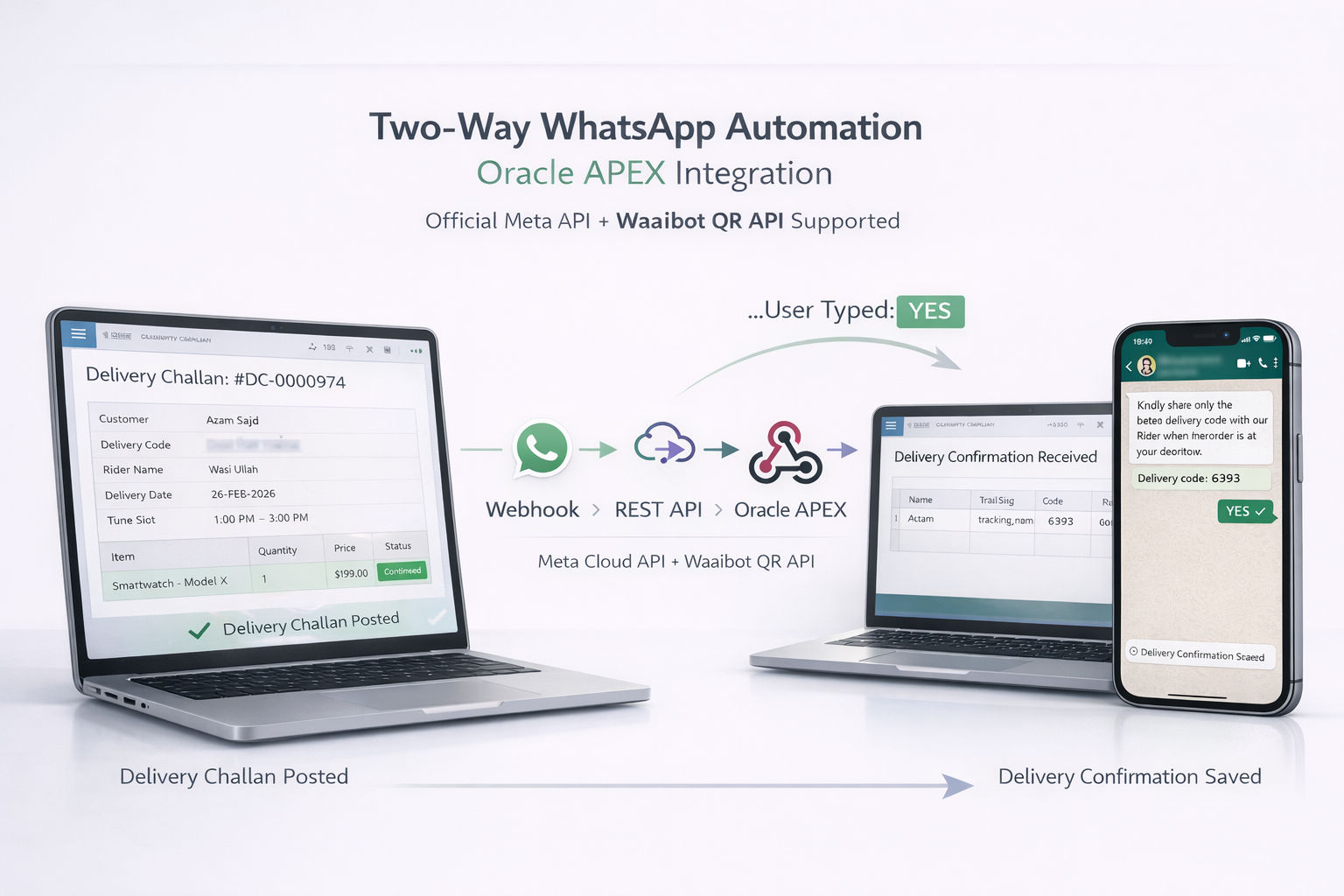
Oracle ERP users have a unique challenge: the database lives on-premise or in a private cloud, and making outbound HTTPS calls requires specific SSL wallet configuration that most tutorials skip entirely. This guide fixes that.
Version Compatibility Matrix
The integration works across all major Oracle versions but the approach differs. Use the table below to find your version.
| Oracle Version | HTTP Package | JSON Support | SSL Wallet | ACL Method |
|---|---|---|---|---|
| 11g (11.2) | UTL_HTTP |
Manual string only | orapki / OWM |
DBMS_NETWORK_ACL_ADMIN (v1)
|
| 12c (12.1/12.2) | UTL_HTTP |
JSON_OBJECT_T (12.2+) | orapki |
APPEND_HOST_ACE (new API)
|
| 18c / 19c | UTL_HTTP |
JSON_OBJECT() function | orapki |
APPEND_HOST_ACE |
| 21c ⭐ | UTL_HTTP |
Full JSON support | orapki -auto_login |
APPEND_HOST_ACE |
| APEX 5.x | APEX_WEB_SERVICE |
Basic only | APEX Instance Admin | Inherited from DB |
| APEX 18.x–24.x ⭐ | APEX_WEB_SERVICE |
Full JSON + REST Sources | Instance Admin or PL/SQL | Inherited from DB |
The Integration Lifecycle
1. Oracle DB
UTL_HTTP or APEX triggers API
2. Waaibot
Runs chatbot logic
3. Customer
Replies via WhatsApp
4. ORDS Webhook
Data posted back to Oracle
One-Time Server Setup
These steps are done once per Oracle DB server. Once configured, all PL/SQL and APEX code in this guide will work.
A SSL Wallet Setup (All Versions)
Oracle cannot make HTTPS calls without a wallet containing the server's certificate chain. The Waaibot API uses Google Trust Services certificates. This is the most common failure point — skip this and you'll get ORA-29024.
⚠️ Auto-login is mandatory: Always create
wallets with -auto_login. Without it, UTL_HTTP cannot open the wallet at
runtime and you will get ORA-28759.
Download directly from our website to your Oracle server. Right-click → Save As from the sidebar, or use the commands below:
:: Create certs folder
mkdir C:\waaibot\certs

:: Download directly from waaibot.com
curl -o "C:\waaibot\certs\gts_root_r4.crt" "https://waaibot.com/assets/certs/gts_root_r4.crt"
curl -o "C:\waaibot\certs\we1_intermediate.crt" "https://waaibot.com/assets/certs/we1_intermediate.crt"
curl -o "C:\waaibot\certs\globalsign_root_ca.crt" "https://waaibot.com/assets/certs/globalsign_root_ca.crt"mkdir -p /opt/waaibot/certs
curl -o /opt/waaibot/certs/gts_root_r4.crt https://waaibot.com/assets/certs/gts_root_r4.crt
curl -o /opt/waaibot/certs/we1_intermediate.crt https://waaibot.com/assets/certs/we1_intermediate.crt
curl -o /opt/waaibot/certs/globalsign_root_ca.crt https://waaibot.com/assets/certs/globalsign_root_ca.crt:: Step 1: Create wallet with auto_login (REQUIRED)
orapki wallet create ^
-wallet "C:\waaibot\wallet" ^
-pwd "YourWalletPassword" ^
-auto_login
:: Step 2: Add all 3 certificates
orapki wallet add -wallet "C:\waaibot\wallet" -pwd "YourWalletPassword" ^
-trusted_cert -cert "C:\waaibot\certs\gts_root_r4.crt"
orapki wallet add -wallet "C:\waaibot\wallet" -pwd "YourWalletPassword" ^
-trusted_cert -cert "C:\waaibot\certs\we1_intermediate.crt"
orapki wallet add -wallet "C:\waaibot\wallet" -pwd "YourWalletPassword" ^
-trusted_cert -cert "C:\waaibot\certs\globalsign_root_ca.crt"
:: Step 3: Verify
orapki wallet display -wallet "C:\waaibot\wallet" -pwd "YourWalletPassword"
:: Expected output — 3 entries under Trusted Certificates:
:: Subject: CN=GTS Root R4,O=Google Trust Services LLC,C=US
:: Subject: CN=WE1,O=Google Trust Services,C=US
:: Subject: CN=GlobalSign Root CA,OU=Root CA,O=GlobalSign nv-sa,C=BEWindows Folder Security Steps:
- Right-click the
C:\waaibot\walletfolder and select Properties. - Navigate to the Security tab and click Advanced.
- Click Enable Inheritance (if it is disabled).
- Click Add, search for
Administratoror your Oracle Service Account (e.g.,DOMAIN\oracleservice). - Grant Full Control or Read & Execute rights,
apply the changes, and verify the
cwallet.ssofile inherited these rights.
📌 Oracle 11g Note: On Oracle 11g, use
Oracle Wallet Manager (OWM) GUI instead of orapki if orapki is
unavailable. The wallet format and location are the same — only the tool differs. In
sqlnet.ora, add
WALLET_LOCATION = (SOURCE=(METHOD=FILE)(METHOD_DATA=(DIRECTORY=C:\waaibot\wallet))).
B Network ACL — Grant Outbound HTTP Access
Oracle blocks all outbound connections by default. Your schema must be granted permission. The method differs by version.
-- Grant your application schema HTTP/HTTPS access to Waaibot
BEGIN
  DBMS_NETWORK_ACL_ADMIN.APPEND_HOST_ACE(
    host => 'api.waaibot.com',
    ace  => xs$ace_type(
               privilege_list => xs$name_list('http', 'connect', 'resolve'),
               principal_name => 'YOUR_SCHEMA_NAME',
               principal_type => xs_acl.ptype_db
             )
  );
  COMMIT;
END;
/

-- Verify
SELECT host, privilege, principal
FROM dba_host_aces
WHERE principal = 'YOUR_SCHEMA_NAME';C APEX Wallet Configuration (APEX users only)
Oracle APEX has its own wallet setting separate from sqlnet.ora. If you skip this, APEX will use the wrong wallet and you'll get ORA-29024 even after the UTL_HTTP test passes.
-- Run as SYS or SYSTEM to set the wallet for the entire APEX instance
BEGIN
    APEX_INSTANCE_ADMIN.SET_PARAMETER(
        p_parameter => 'WALLET_PATH',
        p_value     => 'file:C:\waaibot\wallet'
    );
    COMMIT;
END;
/1 Send a WhatsApp Message from Oracle
Choose your method based on your setup. PL/SQL (UTL_HTTP) works
with any Oracle schema from 11g onward. Oracle APEX uses the higher-level
apex_web_service package available in APEX 5+.
Select Your Message Type Payload
Use this payload to trigger a smart workflow (e.g., dynamic variable injection with buttons or lists).
l_payload := '{
  "recipientNumber": "923022597807",
  "flowId": "303",
  "flowData": {
    "cus_name": "' || :P1_CUSTOMER_NAME || '",
    "tracking_num": "' || :P1_TRACKING_NUM || '",
    "delivery_date": "' || TO_CHAR(:P1_DELIVERY_DATE, 'DD-MON-YYYY') || '"
  }
}';Variable Mapping Concept
The flowId in your payload tells Waaibot which chatbot workflow
to trigger. The keys inside flowData (like cus_name,
tracking_num) are injected into your WhatsApp message template as
{cus_name} placeholders.
These key names must exactly match the placeholder names in your Waaibot Flow Builder.
✅ Recommended for APEX users. Uses
apex_web_service.make_rest_request — simpler, handles response parsing
automatically. Requires wallet configured in APEX Instance Admin (Step C above).
DECLARE
    l_payload  CLOB;
    l_response CLOB;
BEGIN
    -- Build JSON payload (19c+ can use JSON_OBJECT, otherwise use string)
    l_payload := '{
      "recipientNumber": "923022597807",
      "flowId": "303",
      "flowData": {
        "cus_name": "' || :P1_CUSTOMER_NAME || '",
        "tracking_num": "' || :P1_TRACKING_NUM || '",
        "delivery_date": "' || TO_CHAR(:P1_DELIVERY_DATE, 'DD-MON-YYYY') || '"
      }
    }';

    -- Set request headers
    apex_web_service.g_request_headers(1).name  := 'Content-Type';
    apex_web_service.g_request_headers(1).value := 'application/json';
    apex_web_service.g_request_headers(2).name  := 'X-API-Key';
    apex_web_service.g_request_headers(2).value := 'YOUR_WAAIBOT_API_KEY';

    -- Send request
    l_response := apex_web_service.make_rest_request(
        p_url         => 'https://api.waaibot.com/api/v1/send-message',
        p_http_method => 'POST',
        p_body        => l_payload
    );

    -- Check HTTP status
    IF apex_web_service.g_status_code = 200 THEN
        apex_application.g_print_success_message := 'WhatsApp notification sent!';
    ELSE
        apex_error.add_error(
            p_message          => 'WhatsApp failed (HTTP ' || apex_web_service.g_status_code || '): ' || l_response,
            p_display_location => apex_error.c_inline_in_notification
        );
    END IF;
END;2 Configure the Interactive Chatbot Workflow
Instead of a static message, we create a Decision Tree. If the customer replies "YES" (Available), they receive a delivery code. If "NO", the bot collects a reschedule note and fires a webhook back to your Oracle database.
Variable Placeholder Matching
Notice {cus_name} and {tracking_num} in the workflow message
below — these must exactly match the keys you sent in
flowData from Oracle in Step 1.
Learn Visually
Build these workflows using our drag-and-drop builder: Waaibot YouTube Channel
Loading workflow...3 Catch the Response (ORDS Webhook Handler)
When the customer replies, Waaibot POSTs the full context (phone, reply, original flow data) to your ORDS endpoint. This PL/SQL handler parses the JSON and updates your Oracle tables.
How to create the ORDS endpoint:
- Navigate to SQL Workshop → RESTful Services in your APEX workspace.
- Create a new Module (e.g.,
waaibot) and URI Template (e.g.,/v1/webhook-json/). - Add a POST Handler, set Source Type to PL/SQL.
- Copy the full ORDS URL and paste it into the webhook URL field in your Waaibot Flow Builder (the Action node in Step 2).
Version Note:
JSON_OBJECT_T was introduced in Oracle 12.2. For 11g or 12.1, use
APEX_JSON to parse the incoming webhook body instead.
DECLARE
    l_body          BLOB := :body;
    l_json          JSON_OBJECT_T;
    l_submission    JSON_OBJECT_T;
    l_jobdata       JSON_OBJECT_T;

    l_phone         VARCHAR2(50);
    l_user_reply    VARCHAR2(1000);
    l_delivery_code VARCHAR2(100);
    l_tracking_num  VARCHAR2(100);
    l_json_clob     CLOB;
BEGIN
    IF l_body IS NOT NULL THEN
        l_json := JSON_OBJECT_T(l_body);
        l_json_clob := l_json.to_clob();

        -- Extract from Waaibot "submission" object
        l_submission := l_json.get_Object('submission');
        IF l_submission IS NOT NULL THEN
            l_phone      := REPLACE(l_submission.get_String('chatId'), '@c.us', '');
            l_user_reply := l_submission.get_String('response');

            l_jobdata := l_submission.get_Object('jobData');
            IF l_jobdata IS NOT NULL THEN
                l_delivery_code := l_jobdata.get_String('delivery_code');
                l_tracking_num  := l_jobdata.get_String('tracking_num');
            END IF;
        END IF;

        -- Update your order table
        IF l_delivery_code IS NOT NULL THEN
            UPDATE YOUR_SCHEMA.ORDER_STATUS_TABLE
            SET
                RESCHEDULE_NOTES       = l_user_reply,
                AVAILABLE_FOR_DELIVERY = 'NO',
                LAST_UPDATED           = SYSDATE
            WHERE DELIVERY_CODE = l_delivery_code;
        END IF;

        -- Audit log
        INSERT INTO YOUR_SCHEMA.WHATSAPP_WEBHOOK_LOG (
            LOG_DATE, PHONE_NO, LOG_TYPE, REMARK, RAW_JSON
        ) VALUES (
            SYSDATE, l_phone, 'WAAIBOT_WEBHOOK',
            'Customer replied: ' || l_user_reply, l_json_clob
        );
        COMMIT;
    END IF;

    -- Return 200 to Waaibot
    owa_util.status_line(200, '', false);
    owa_util.mime_header('application/json', true);
    htp.p('{"status":"success","message":"Oracle updated successfully"}');

EXCEPTION WHEN OTHERS THEN
    owa_util.status_line(500, '', false);
    owa_util.mime_header('application/json', true);
    htp.p('{"status":"error","message":"' || SQLERRM || '"}');
END;Troubleshooting Common Errors
ORA-28759: failure to open file
Cause: Wallet file exists but Oracle service account cannot read it, OR wrong password passed to auto-login wallet.
Fix 1 (21c/19c): Pass NULL as password — auto-login
wallets (cwallet.sso) don't need a password.
Fix 2: Ensure the Oracle Service Account has Read & Execute rights on the wallet folder and the .sso file. See Step A3 for folder inheritance instructions. Note: The wallet will refuse to open if the specific cwallet.sso file does not inherit these exact security rights.
Fix 3: Recreate wallet: orapki wallet create -wallet "path" -pwd "pass" -auto_login
ORA-29024: Certificate validation failure
Cause: Wallet is missing one or more certs in the chain. Waaibot uses Google Trust Services which requires 3 certs.
Fix: Download and add all 3 certs from the sidebar: GTS Root R4,
WE1 Intermediate, GlobalSign Root CA. Run orapki wallet display to confirm
all 3 appear.
APEX extra step: If UTL_HTTP works but APEX still fails, APEX
uses its own wallet — set it via APEX_INSTANCE_ADMIN.SET_PARAMETER('WALLET_PATH', ...)
ORA-24247: network access denied by access list
Cause: Schema not granted HTTP access in the Oracle network ACL.
Fix: Run the ACL setup in Section B above as SYSDBA. Use the 11g version for Oracle 11g, and the 12c+ version for everything else.
ORA-29106: Cannot import PKCS #12 wallet
Cause: ewallet.p12 and cwallet.sso are out of sync (e.g., cert added via UI only updated one file).
Fix: Regenerate cwallet.sso from ewallet.p12: orapki wallet create -wallet "path" -auto_login
(it will prompt for p12 password).
HTTP 401 Unauthorized
SSL ✅ Working — API Key issue
SSL handshake succeeded. Check your X-API-Key header value. Copy it
fresh from your Waaibot Portal → Device Management.
HTTP 400 Bad Request
SSL ✅ Working — Payload issue
SSL is working. Missing required fields in JSON body. Ensure recipientNumber is present. For
flow triggers, ensure flowId is
correct.
Tutorial Complete! 🎉
Congratulations! You have successfully configured your Oracle Database to communicate with the WhatsApp API. Your PL/SQL environment is now equipped as a powerful, real-time messaging engine.
Limitless Possibilities
This Delivery Notification system is just one example. The same architecture works for any Oracle ERP use case.
Beyond WhatsApp: One Workflow, Every Platform
Waaibot offers a Unified Workflow System. Build the same logic once and deploy it across all your sales channels simultaneously.
Trigger delivery notifications from your Shopify store, handle support on Instagram, and sync everything back to your Oracle ERP. Build once, deploy everywhere.
Need Implementation Help?
Our team can assist with Oracle APEX integration, custom wallet configuration, EBS integration, and webhook setup.
Contact Support Team✨ Fully Automated Loop
You've bridged Oracle and WhatsApp. No manual data entry, no missed calls — pure automated logic that works 24/7.
Build Your First Chatbot Free